Production vs Development Environment Explained
A development environment is where you build and break things safely. A production environment is where real users are actually using your app, which means every change carries real consequences. The single biggest mistake developers make is treating production like a bigger version of dev rather than as an operational posture with its own rules.
Production means separate data, restricted access, active monitoring, and releases that pass through gates before they ship. Dev means freedom to experiment, break, and iterate without anyone noticing.
If you take one thing from this article, take this:
- Production is not simply an environment with more traffic than dev; it follows an entirely different set of operating rules.
- Treat prod access as a privilege, not a default. Limit who can touch it and log everything.
- Never assume staging caught everything. It usually doesn’t reproduce real-world scale.
Pro Tip: Before your next deploy, ask “what breaks here that wouldn’t break in dev?” If you can’t answer that in ten seconds, you don’t understand your production environment well enough yet.
Key Takeaways
Production requires strict operational controls (data isolation, access limits, monitoring, gated releases) while development prioritizes fast iteration with disposable, low-risk changes.
| Point | Details |
|---|---|
| Definitions matter | Development is your sandbox, staging is a near-production mirror, production is the live system real users depend on. |
| Parity reduces drift | Twelve-Factor’s dev-prod parity principle cuts the time, personnel, and tools gaps that cause “works on my machine” failures. |
| Staging has limits | Staging often can’t reproduce production scale, so canary and phased rollouts catch what staging misses. |
| Checklists prevent incidents | A pre-deploy checklist covering CI status, secrets, migrations, and monitoring catches most preventable failures. |
| Automate the manual steps | Vibeprod scans repositories for exposed secrets and misconfigurations, opening reviewable fix pull requests in under two minutes. |
Table of Contents
- What Is a Development Environment vs a Production Environment?
- Testing vs Production Environment: What Actually Changes
- Why Dev-Prod Parity Matters (and Where It Breaks Down)
- Best Practices for Moving Code Safely to Production
- Pre-Deploy Checklist: What to Verify Before You Push to Production
- How Automated Scanning Closes the Gap Between Checklist and Habit
- Who Owns Development and Who Owns Production
- Development Environment Setup vs Production Stack: Tooling Differences
- Why Most “Environment Parity” Advice Misses the Point
- Ship With Confidence, Not a Manual Checklist
- Sources
- FAQ
What Is a Development Environment vs a Production Environment?
Most teams work across three environment tiers, and confusing them is where trouble starts. Understanding development environments means recognizing that each tier has a distinct job, distinct data, and a distinct level of risk tolerance.
Development is your private sandbox. You run code locally or on a personal branch, use test or synthetic data, and can break things freely because nothing you touch affects a real user. Iteration speed matters more than stability here.
Staging, sometimes called pre-production, is a near-production mirror used for final acceptance testing before release. It typically runs on infrastructure similar to production and may use sanitized copies of real data or dedicated test accounts. Its whole purpose is to catch problems before they reach real users, though it comes with a catch worth remembering.
Production is the live environment. Real users, real data, real money on the line if something breaks. It carries the full operational load: monitoring, backups, access controls, and incident response plans that dev and staging simply don’t need.
- Development: local or cloud sandbox, test data, high change tolerance
- Staging: production-like mirror, sanitized data, final validation step
- Production: live system, real data, strict operational controls
Environments are commonly organized in exactly this progression, from DEV to TEST to STAGING to PROD, with each tier adding stricter controls than the last.
Testing vs Production Environment: What Actually Changes
Moving code from dev to production changes almost everything about how it behaves and how much scrutiny it deserves. Here’s what shifts, tier by tier.
Stability expectations flip entirely. A crashed dev environment costs you ten minutes. A crashed production environment costs you users, revenue, and trust. Error tolerance in dev is high; in production, it’s close to zero for core flows.
Data handling is the starkest difference. Dev and staging should run on mock or sanitized data, never real customer records. Production holds the real thing, complete with backup and retention obligations that dev environments don’t carry.
Access and secrets follow the principle of least privilege in production: only the people and services that need access get it, and that access is logged. Dev environments can afford to be looser, but even there, production credentials leaking into local setups is one of the most common security failures teams face.
Scale is another gap that catches people off guard. Your laptop handles one user just fine. Production might handle thousands of concurrent sessions across distributed infrastructure, and that jump exposes bugs that never show up locally.
- Release cadence: dev changes constantly, production ships through gated, reviewed pipelines
- Monitoring: dev has none, production needs real-time observability and alerting
- Incident response: dev has no formal process, production requires runbooks and on-call coverage
Staging often can’t fully replicate production traffic or scale, which is exactly why canary releases and phased rollouts exist as a safety net for what staging misses.
Why Dev-Prod Parity Matters (and Where It Breaks Down)
The Twelve-Factor App methodology names this problem directly: minimize the gap between development and production, because every gap is a place where bugs hide until it’s too late to catch them cheaply. It identifies three gaps worth watching.
- The time gap. Code sits for weeks before deploying, drifting further from what’s actually running in production.
- The personnel gap. Developers write code, but a separate ops team deploys it, losing context along the way.
- The tools gap. Dev uses SQLite locally while production runs PostgreSQL, or dev skips a caching layer that production depends on.
Each gap creates drift, and drift creates the classic “works on my machine” failure. Config settings diverge. Dependency versions go unpinned and quietly update to incompatible releases. Someone hardcodes a secret locally that never gets rotated before it ends up in a commit.
The consequences aren’t abstract. Drift causes production failures that never showed up in testing, performance bottlenecks that only appear under real load, and security incidents traced back to a secret that should have stayed local.
Mitigating this comes down to a few concrete habits: use containers or infrastructure-as-code so environments are provisioned identically, pin your dependency versions instead of trusting “latest,” and route all secrets through a dedicated secret manager instead of environment files sitting in a repo.

Pro Tip: If your staging environment doesn’t use the same infrastructure-as-code templates as production, it isn’t really staging. It’s a guess.
Best Practices for Moving Code Safely to Production
Getting code from a developer’s branch to a live user safely isn’t about writing perfect code. It’s about building a pipeline that catches imperfect code before it matters.
- Gate your CI/CD pipeline. Automated tests and policy checks should block a merge, not just warn about it. A pipeline that only suggests fixes gets ignored under deadline pressure.
- Roll out gradually. Canary releases and feature flags let you expose new code to a small slice of real traffic first, so a bad release affects 5% of users instead of 100%.
- Externalize configuration. Environment-specific settings belong in versioned config, not hardcoded into the app, so the same build artifact runs identically everywhere.
- Test performance in staging, then smoke-test after rollout. Staging catches obvious breaks; a smoke test right after deploy catches what staging’s scale couldn’t.
- Build observability before you need it. Define SLIs and SLOs, set up alerting, and write runbooks before an incident, not during one.
The teams that recover fastest from production incidents aren’t the ones with the fewest bugs. They’re the ones with a runbook already written, so nobody’s improvising at 2 a.m. while users watch the app go down.
None of this replaces good judgment, but it removes the need to rely on judgment alone under pressure, which is exactly when judgment tends to fail.
Pre-Deploy Checklist: What to Verify Before You Push to Production
Run through this before every production deploy, not just the big ones. Small releases cause outages just as often as large ones, usually because they skipped the checklist.
- Confirm a green CI pipeline with test coverage above your team’s agreed threshold.
- Audit secrets and config to confirm nothing environment-specific, and nothing sensitive, is sitting in the repo.
- Verify your database migration plan and confirm backups exist and have actually been restore-tested, not just taken.
- Smoke-test monitoring and alerting so you know a failed deploy triggers a real alert, not silence.
- Validate your runbooks are current, not written for an architecture you replaced six months ago.
- Run a security and dependency scan and confirm you have a mitigation plan for anything it flags.
A solid pre-deploy checklist covers CI status, a secrets audit, a migration strategy, monitoring smoke tests, and a rollback plan, and automating those checks is usually the difference between a checklist that gets followed and one that gets skipped when the deadline is tight.
How Automated Scanning Closes the Gap Between Checklist and Habit
Most of that checklist is manual, which means it’s the first thing skipped under deadline pressure. That’s the actual gap Vibeprod exists to close.
Vibeprod scans your GitHub repository and flags the launch risks that manual review tends to miss: exposed secrets, authentication gaps, compliance issues, and CI/CD or infrastructure misconfigurations. It maps directly onto the checklist above:
- Secrets audit becomes automatic secrets detection, not a manual repo search before every release.
- Infra misconfiguration checks get flagged with plain-English explanations of what’s wrong and why it matters.
- Fixes arrive as reviewable pull requests, not silent auto-merges. You stay in control of what ships.
The whole scan runs in under two minutes, and it doesn’t touch your existing features. It just tells you what’s risky before your users find out the hard way.
Pro Tip: Run an automated repo scan the same day you finish a feature, not the day before launch. Fixing a flagged issue with two weeks of runway is routine. Fixing it two hours before launch is a fire drill.
Who Owns Development and Who Owns Production
Development environments are usually owned by individual developers or small feature teams. You control your own sandbox, your own branch, your own pace of iteration. Nobody needs to approve your experiments, and that autonomy is the entire point. Code review happens before merge, but the dev environment itself answers to no one but you.
Production ownership looks completely different, and the shift catches a lot of solo developers and small teams off guard. Production typically involves shared responsibility: the developer who wrote the code, a reviewer who approved the pull request, and often a platform or DevOps function that owns the infrastructure the code runs on. Larger organizations split this further into site reliability engineers who own uptime and incident response, security teams who own access policy, and compliance functions who own audit trails.
Solo developers and small teams don’t have that luxury of specialization. If you’re a solopreneur shipping your own SaaS product, you’re the developer, the reviewer, and the on-call engineer, often all in the same afternoon. That’s exactly why automated checks matter more for small teams than large ones. A twelve-person platform team catches misconfigurations through sheer redundancy of eyes. A solo founder has no redundancy at all, so the review step either happens through tooling or it doesn’t happen.
Whoever owns production also owns the fallout when something breaks, which is reason enough to keep that ownership explicit rather than assumed.
Development Environment Setup vs Production Stack: Tooling Differences
The tools you reach for in development rarely match what actually runs your production stack, and that mismatch is often intentional. Local development environments favor speed of iteration: lightweight databases like SQLite, hot-reloading dev servers, mocked third-party APIs, and minimal authentication so you’re not fighting login screens while debugging.
Production trades that convenience for reliability and scale. A managed PostgreSQL or MySQL instance replaces SQLite. Load balancers and container orchestration platforms like Kubernetes replace a single local process. Real third-party integrations replace mocks, and authentication runs through full identity providers instead of a bypass flag.
CI/CD tooling itself often differs by tier too. Dev might rely on a simple test runner triggered on every commit, while production deployments run through a more elaborate pipeline involving staged approvals, automated security scans, and infrastructure-as-code tools like Terraform to keep environments consistent. Monitoring stacks appear almost exclusively in production and staging: tools like Prometheus, Grafana, or a hosted APM service track latency, error rates, and uptime in ways a local dev environment never needs.
None of this means dev tooling is inferior. It means dev tooling optimizes for a different variable entirely, iteration speed instead of reliability, and conflating the two is how teams end up debugging production issues with tools built for a completely different job.
Why Most “Environment Parity” Advice Misses the Point
Most guides on this topic treat dev-prod parity as a technical checkbox: match your dependency versions, containerize everything, call it done. That advice isn’t wrong, but it undersells the real problem. Parity fails most often not because of mismatched tooling, but because of mismatched attention. Developers spend hours perfecting local setups and minutes reviewing what actually ships.
The uncomfortable truth is that most production incidents at small teams aren’t caused by exotic bugs. They’re caused by an exposed API key, a misconfigured environment variable, or a dependency nobody updated in eight months, the kind of issue a five-minute manual review would catch if anyone had five minutes to spare before a launch.
That’s where solo developers and small teams get shortchanged by conventional wisdom. Advice built for platform teams with dedicated SREs doesn’t translate cleanly to someone shipping a product alone at 11 p.m. The fix isn’t more discipline. It’s better defaults, tooling that catches what a rushed human will miss, explained in plain language instead of a wall of CVE numbers nobody has time to research.
Prioritize automated repo checks before you prioritize a perfect staging environment. A near-perfect staging tier still won’t catch a leaked secret. A repo scan will.
— Vibeprod
Ship With Confidence, Not a Manual Checklist
Vibeprod gives solo developers and small teams the review layer a platform team would otherwise provide, without hiring one. It scans your repository, flags what’s actually risky, and hands you fixes you can approve in minutes.
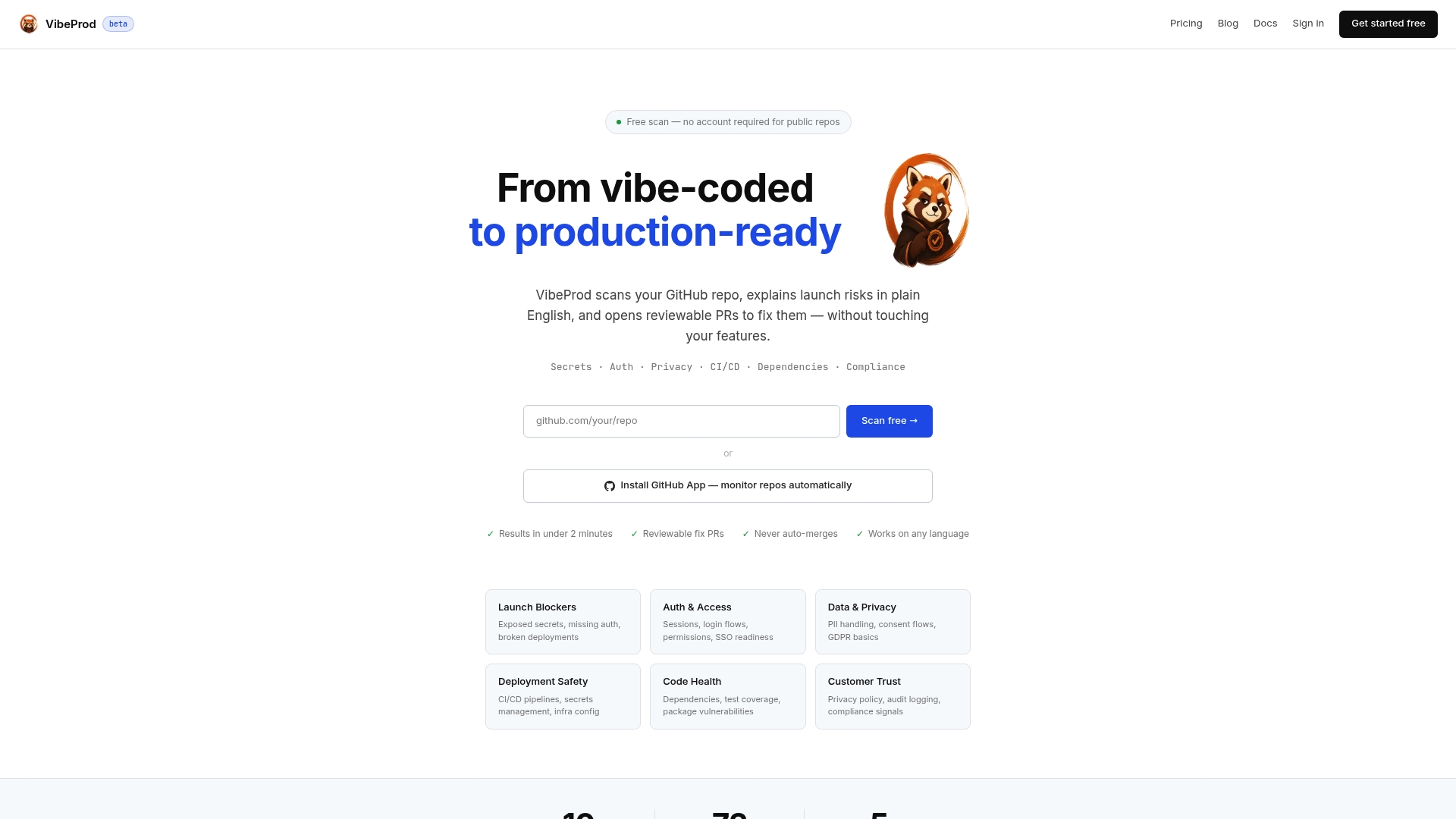
Three things it checks before you ship:
- Exposed secrets and credentials left in commits, branches, or config files.
- Infrastructure and CI/CD misconfigurations that pass tests but fail under real production conditions.
- Compliance and dependency risks, explained in plain English instead of a raw vulnerability ID.
Every fix arrives as a reviewable pull request. Nothing auto-merges, and nothing touches the features you already built. If you want to see what your own repository is hiding before your next release, start a scan with Vibeprod and get results in under two minutes.
Sources
- What is a Production Environment? | PagerDuty
- Dev/prod parity — The Twelve-Factor App
- What is production environment? | phoenixNAP
- Deployment environment — Wikipedia
FAQ
What Is the Difference Between Production and Development Environment?
A development environment is a private workspace for building and testing code without affecting real users; a production environment is the live system where real users interact with the finished software.
What Is the Difference Between Development and Production?
Development prioritizes fast iteration with test data and high error tolerance, while production demands strict access controls, real user data protections, and near-zero tolerance for downtime.
What Are the Three Different Types of Environments?
The three common tiers are development (local or sandbox work), staging or pre-production (a near-production mirror for final testing), and production (the live environment serving real users).
What Are the Differences Between Production, Staging, and Development Environments?
Development uses synthetic data and allows constant change, staging uses sanitized data to validate a release before launch, and production runs real data under full operational controls including monitoring and backups.
Can Automated Tools Help Bridge Development and Production Safely?
Yes. Tools like Vibeprod scan repositories for exposed secrets, misconfigurations, and compliance gaps, then generate reviewable fix pull requests before code reaches production.